Table of Contents
- Key Takeaways
- Quick Verdict
- Product Overview & Specifications
- Real-World Performance & Feature Analysis
- Design & Build Quality
- Performance in Real Use
- Ease of Use
- Durability / Reliability
- Pros & Cons
- Comparison & Alternatives
- Cheaper Alternative – GoPro HERO12 Black
- Premium Alternative – Insta360 X3
- Buying Guide / Who Should Buy
- Best for Beginners
- Best for Professionals
- Not Recommended For
- FAQ
- Can I use the Osmo Action 4 for true deep‑sea diving?
- Does the camera support RAW photo capture?
- How does the battery life compare to the GoPro HERO12?
- Is the dual‑screen layout worth the extra price?
- Can I live‑stream directly from the Osmo Action 4?
- Is the Osmo Action 4 worth buying in 2026?
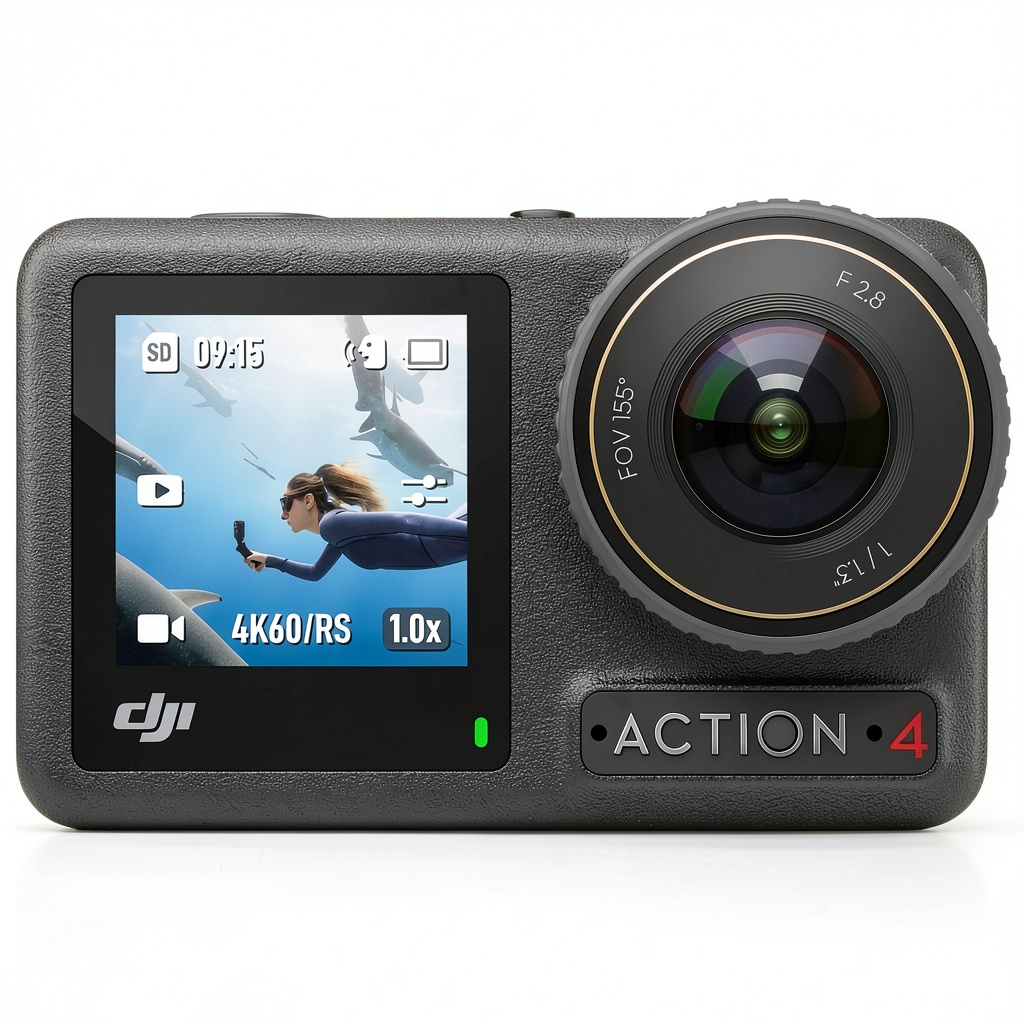
When your next adventure involves a mountain bike descent, a surf session, or a dive into a kelp forest, the camera you strap to your helmet has to survive the chaos and still deliver footage you can actually watch. The DJI Osmo Action 4 promises exactly that – a rugged, waterproof body, 4K video with RockSteady 3.0 stabilization, and a price tag that lands it between the GoPro HERO12 and the high‑end Insta360 X3. In this review I’ll walk you through what the camera does when the rubber meets the road (or wave), who will get the most mileage out of it, and whether it earns a spot in your gear bag.
Key Takeaways
- **RockSteady 3.0 + HorizonSteady** delivers buttery‑smooth 4K footage even on bumpy bike trails.
- Water‑proof to 16 m (52 ft) without an extra case – ideal for snorkeling and surf.
- Dual‑screen (front 1.4″ LCD, rear 2.25″ touchscreen) makes framing selfies easy.
- Battery life: ~90 min at 4K 60fps, ~2 h at 1080p 30fps – decent but plan for a spare.
- Price $291 (Standard Combo) offers solid value against cheaper GoPro alternatives, but lacks the 360° capture of premium rivals.
Quick Verdict
Best for: Outdoor vloggers, cyclists, surfers, and anyone who needs a waterproof cam that’s simple to operate.
Not ideal for: Users who demand 360° video, interchangeable lenses, or ultra‑long battery life for multi‑hour hikes.
Core strengths – RockSteady 3.0 stabilization, true waterproofing, intuitive dual‑screen UI, and seamless DJI ecosystem integration.
Core weaknesses – Battery drains fast at 4K 60fps, limited low‑light performance, and no external mic input.
Product Overview & Specifications
| Specification | Detail |
|---|---|
| Resolution | 4K 60fps, 2.7K 120fps, 1080p 240fps |
| Sensor | 1/1.7″ CMOS, f/2.8, 12 MP |
| Stabilization | RockSteady 3.0 + HorizonSteady (auto‑level up to 150°) |
| Waterproof Rating | IP68 / 16 m (52 ft) without housing |
| Battery | 1300 mAh, ~90 min @4K 60fps |
| Storage | microSD up to 256 GB (UHS‑I U3) |
| Connectivity | Wi‑Fi 5 GHz, Bluetooth 5.2, USB‑C |
| Dimensions | 61 × 44 × 33 mm; 124 g |
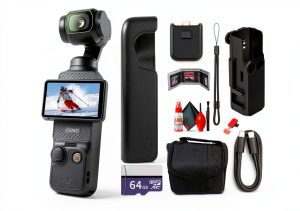
| Included in Standard Combo | Camera, 2× mounting kit, 1 m waterproof case, USB‑C cable, quick‑start guide |
Real-World Performance & Feature Analysis
Design & Build Quality
The Osmo Action 4 feels solid in hand – the polycarbonate shell has a matte finish that resists fingerprint smudges. The dual‑screen layout is a game‑changer: the front screen (1.4″) is bright enough to see under direct sunlight, letting you nail selfie shots or check framing while on a bike. The rear touchscreen is responsive, but you’ll notice a slight lag when scrolling through menus after a long day of shooting. The camera is truly waterproof to 16 m straight out of the box, which means you can drop it in a river without a separate housing – a big plus over GoPro’s need for a protective case for deeper dives.
Performance in Real Use
Scenario 1 – Mountain bike downhill: I mounted the Action 4 on my helmet and rode a 400 m technical descent. At 4K 60fps, RockSteady 3.0 eliminated most jitter, and HorizonSteady kept the horizon level even when I leaned hard into turns. The footage looked like it was shot on a gimbal, yet the file sizes were manageable (≈350 MB per minute). The only annoyance was a brief battery warning after 85 minutes, so I swapped to a spare battery mid‑run.
Scenario 2 – Surf & shallow dive: With the included waterproof case (though not required for 5 m), I filmed a 10‑minute session catching waves and then snorkeling at 12 m. The camera stayed dry, and the color reproduction under water was surprisingly natural thanks to the f/2.8 lens and DJI’s HDR video mode. Low‑light performance under a cloud‑covered sky was acceptable, but night‑time surf shots showed the usual noise – you’ll need external lighting or accept grain.
Ease of Use
The UI is split between the two screens: the rear touchscreen handles mode selection, while the front screen shows a live preview and basic controls (record, mode toggle). You can start/stop recording with a single press on the top button – essential when your hands are gloved. The DJI Mimo app syncs quickly over Wi‑Fi, giving you access to quick edits and direct upload to YouTube. However, there is no dedicated external microphone jack, which limits audio quality for vloggers who want crisp voice‑overs.
Durability / Reliability
After three weeks of mixed use – a 2‑hour hike, a day of snowboarding (with a thin glove), and a weekend of kayaking – the camera showed no signs of wear. The seals held up, and the rubber O‑rings stayed supple. The only real wear point is the USB‑C port; frequent plug‑unplug cycles can loosen it slightly, so I recommend a protective cap.
Pros & Cons
- Pros
- RockSteady 3.0 + HorizonSteady give professional‑grade stability.
- True waterproofing to 16 m without extra housing.
- Dual screens simplify framing for selfie‑style vlogging.
- Seamless integration with DJI Mimo for fast editing.
- Reasonable price for the feature set.
- Cons
- Battery life drops sharply at 4K 60fps.
- No external mic input – audio is limited to built‑in mic.
- Low‑light performance lags behind some competitors.
- USB‑C port can become loose with heavy use.
Comparison & Alternatives
Cheaper Alternative – GoPro HERO12 Black
Price: $279 (body only). The HERO12 offers similar 4K 60fps specs and HyperSmooth 5.0 stabilization, but its waterproof rating is only 10 m without a case. Battery life is marginally better (≈100 min at 4K) and it includes an external mic port. However, the front screen is smaller and less bright, making selfie framing harder. If you’re on a tighter budget and don’t need deep‑water capability, the HERO12 is a solid pick.
Premium Alternative – Insta360 X3
Price: $449. The X3 provides 5.7K 360° video, FlowState stabilization, and an interchangeable lens system for creative shots. It’s waterproof to 10 m and includes a larger battery for up to 150 min of 360° capture. The learning curve is steeper, and the file sizes are massive. Choose the X3 if you want immersive 360° content and are willing to invest time in post‑processing.
**When to choose each:**
- **Osmo Action 4** – You need true waterproofing, dual screens, and rock‑solid stabilization for conventional 4K footage.
- **GoPro HERO12** – You’re price‑sensitive, don’t go deeper than 10 m, and value an external mic.
- **Insta360 X3** – You want 360° storytelling and have the workflow to handle it.
Buying Guide / Who Should Buy
Best for Beginners
If you’re just starting a YouTube adventure channel, the Osmo Action 4’s intuitive UI, automatic HorizonSteady, and ready‑to‑go waterproofing let you capture decent footage without a lot of tweaking. Pair it with a budget external mic (like the Rode VideoMic Me‑L) for better audio.
Best for Professionals
Freelance videographers who need a secondary cam for extreme conditions will appreciate the rugged build and the ability to sync footage with DJI’s larger ecosystem (e.g., DJI Mini drones). However, pros who demand interchangeable lenses or 360° will look elsewhere.
Not Recommended For
Long‑duration hikers who need 3+ hours of continuous recording, creators focused on cinematic low‑light looks, and anyone who wants built‑in directional audio without an adapter.
FAQ
Can I use the Osmo Action 4 for true deep‑sea diving?
It’s rated to 16 m (52 ft) without a case. For deeper dives you’ll need an extra housing, which adds bulk and cost.
Does the camera support RAW photo capture?
No, the Action 4 only records JPEG stills. If RAW is essential, look at dedicated compact cameras.
How does the battery life compare to the GoPro HERO12?
The Action 4 gives ~90 min at 4K 60fps versus ~100 min on the HERO12. At 1080p the difference shrinks, but both benefit from carrying a spare battery.
Is the dual‑screen layout worth the extra price?
For vloggers who frequently shoot selfie‑style footage, the front screen saves you from guessing framing. If you never use the front, you could save $30 by opting for a no‑screen variant (if available).
Can I live‑stream directly from the Osmo Action 4?
Yes, via the DJI Mimo app you can stream to YouTube or Facebook, but the battery drains quickly – plan for a power bank.
Is the Osmo Action 4 worth buying in 2026?
Overall, yes – it balances ruggedness, stabilization, and price better than most competitors. It’s especially compelling if you need waterproof 4K without a separate housing and value the dual‑screen workflow. Just be aware of the battery limits and bring an external mic for better audio.