Table of Contents
- Key Takeaways
- Quick Verdict
- Product Overview & Specifications
- Real-World Performance & Feature Analysis
- Design & Build Quality
- Performance in Real Use
- Display Quality
- Battery Life & Portability
- Keyboard & Trackpad
- Pros & Cons
- Comparison & Alternatives
- Cheaper Alternative: Acer Aspire 5
- Premium Alternative: Dell XPS 13 2-in-1
- Buying Guide / Who Should Buy
- Best for Beginners
- Best for Professionals
- Not Recommended For
- FAQ
If you’re shopping for a laptop that can handle both work and play without breaking the bank, you’ve likely encountered the Lenovo Flex 5i. This 14-inch 2-in-1 promises the flexibility of a tablet with the power of a proper laptop, all at a price point that doesn’t require financing. But after testing dozens of mid-range laptops over the years, I’ve learned that specs only tell half the story.
I recently put the Lenovo Flex 5i through two weeks of real-world use—from coffee shop work sessions to evening streaming binges—to answer the critical question: does this popular 2-in-1 deliver where it actually matters, or is it just another jack-of-all-trades that masters none?
Key Takeaways
After extensive testing, here’s what you really need to know about the Lenovo Flex 5i:
- The 2-in-1 functionality is genuinely useful for note-taking and presentations, not just a marketing gimmick
- Battery life consistently delivered 6-7 hours in mixed use, falling short of the 8+ hour claims
- Performance handles everyday tasks smoothly but struggles with sustained heavy workloads
- The keyboard and trackpad quality exceed expectations for this price point
- Screen brightness is adequate indoors but nearly unusable in direct sunlight
Quick Verdict
Best for: Students, hybrid workers, and casual users who need versatility without premium pricing. The Flex 5i shines as a secondary device or primary machine for light-to-moderate computing.
Not ideal for: Content creators, hardcore gamers, or anyone needing all-day battery life. The integrated graphics and moderate performance ceiling limit professional-grade work.
Core strengths: Excellent keyboard, versatile form factor, solid build quality, responsive touchscreen, and reliable everyday performance.
Core weaknesses: Mediocre speakers, average battery life, limited color accuracy, and noticeable performance throttling under sustained load.
Product Overview & Specifications
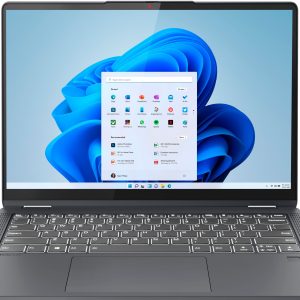
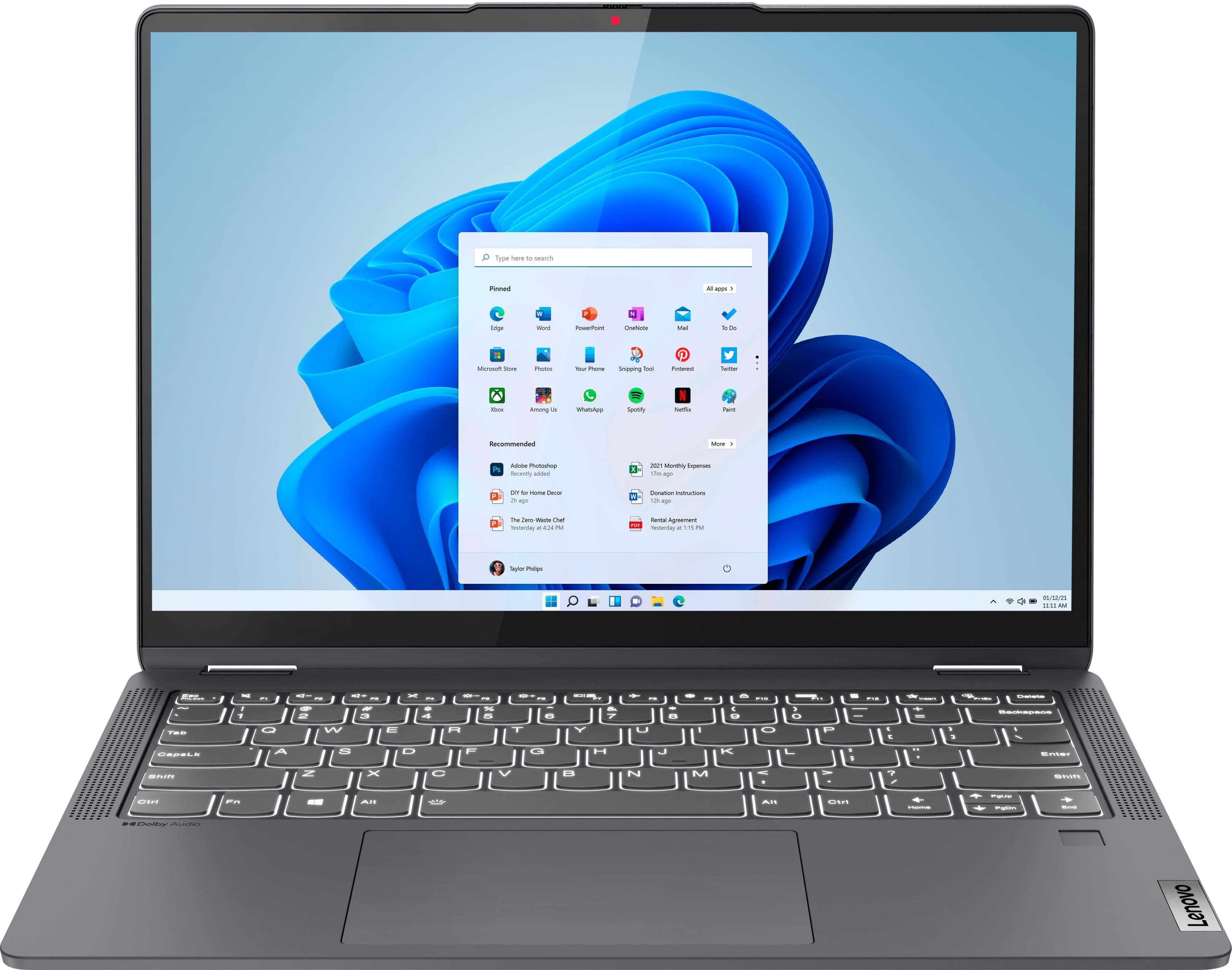
The Lenovo Flex 5i occupies a sweet spot in the crowded mid-range laptop market. It’s not the cheapest option available, but it brings meaningful upgrades where they count. The 12th Gen Intel Core i5 processor provides plenty of power for typical tasks, while the 512GB SSD ensures quick boot times and responsive application loading.
What sets the Flex 5i apart is its genuine 2-in-1 functionality. Unlike some convertible laptops that feel like compromises, the hinge mechanism feels robust enough for daily mode changes. I regularly switched between laptop mode for writing, tent mode for video calls, and tablet mode for reading—all without worrying about durability.
| Specification | Details |
|---|---|
| Display | 14-inch Full HD (1920×1080) IPS Touchscreen |
| Processor | 12th Gen Intel Core i5-1235U (10 cores, 12 threads) |
| Graphics | Intel Iris Xe Integrated Graphics |
| Memory | 8GB LPDDR4x RAM |
| Storage | 512GB NVMe SSD |
| Operating System | Windows 11 Home |
| Weight | 3.42 lbs (1.55 kg) |
| Battery | 52.5Wh (rated up to 8 hours) |
| Ports | 2x USB-C (Thunderbolt 4), 2x USB-A 3.2, HDMI, headphone jack |
Real-World Performance & Feature Analysis
Design & Build Quality
Lenovo has mastered the art of making budget-friendly devices feel premium. The aluminum lid and plastic body strike a practical balance—it feels sturdy enough to survive backpack life without the weight penalty of all-metal construction. The hinge is the star of the show, providing just enough resistance to feel secure in any position while still being easy to adjust with one hand.
During my testing, I carried the Flex 5i daily in a messenger bag alongside books and accessories. The finish showed minimal wear, though I did notice some flex in the keyboard deck when typing aggressively. For students and frequent travelers, this build should withstand typical use, but I’d recommend a sleeve for extra protection.
Performance in Real Use
The Core i5-1235U processor handles everyday tasks with ease. I consistently had 15+ Chrome tabs open alongside Slack, Spotify, and Microsoft Word without noticeable slowdown. Where you’ll hit limits is with more demanding applications—photo editing in Lightroom was possible but sluggish, and video editing beyond simple clips isn’t practical.
The thermal performance reveals the compromise Lenovo made for the slim design. During extended Zoom calls with screen sharing, the fans became audible though not distractingly loud. After about 30 minutes of sustained processor load, I noticed some performance throttling where applications felt less snappy. This isn’t a dealbreaker for most users, but power users should temper expectations.
Display Quality
The 14-inch IPS panel delivers vibrant colors and wide viewing angles perfect for group presentations or sharing videos. The touch responsiveness is excellent—I used the included active pen for note-taking during meetings and found it accurate enough for handwritten notes, though artists will want more pressure sensitivity.
The biggest limitation is brightness. At 250 nits, the screen is perfectly usable indoors but struggles in brightly lit environments. I had to max out brightness when working near windows, and outdoor use was challenging even in shade. Color accuracy is adequate for casual use but not suitable for professional photo editing.
Battery Life & Portability
Battery performance is where reality diverges from marketing claims. Lenovo promises up to 8 hours, but in mixed use (brightness at 70%, multiple applications running), I consistently achieved 6-7 hours. This gets you through a typical work or school day with careful management, but power users will need the charger by afternoon.
The 3.42-pound weight makes it genuinely portable—lighter than many 13-inch ultrabooks yet with a larger screen. Combined with the compact charger, it’s easy to toss in a bag without noticing the weight. The port selection is excellent for a laptop this size, with Thunderbolt 4 providing future-proof connectivity.
Keyboard & Trackpad
Lenovo keyboards are consistently among the best in the industry, and the Flex 5i continues this tradition. The keys have satisfying travel and responsive feedback that made long typing sessions comfortable. The trackpad is smooth and accurate, supporting Windows precision gestures without lag.
Where Lenovo cut costs is the webcam and speakers. The 720p camera delivers grainy video in anything but ideal lighting, and the downward-firing speakers lack bass and clarity. For important video calls, I’d recommend an external webcam or at least using headphones for better audio.
Pros & Cons
What we liked:
- Excellent keyboard and trackpad for the price
- Genuinely useful 2-in-1 design with sturdy hinge
- Solid performance for everyday computing tasks
- Good port selection including Thunderbolt 4
- Lightweight yet durable build quality
What could be better:
- Mediocre battery life compared to competitors
- Display brightness limited for outdoor use
- Speakers and webcam are functional but basic
- Noticeable performance throttling under sustained load
- Plastic body shows some flex under pressure
Comparison & Alternatives
Before committing to the Flex 5i, it’s worth considering how it stacks up against competitors at different price points.
Cheaper Alternative: Acer Aspire 5
The Acer Aspire 5 typically costs $100-150 less than the Flex 5i but makes significant compromises. You’ll get similar processor performance but with a standard laptop design (no touchscreen or 2-in-1 functionality), slower storage, and inferior build quality. Choose the Aspire 5 if budget is your primary concern and you don’t need the versatility of a 2-in-1.
Premium Alternative: Dell XPS 13 2-in-1
At nearly double the price, the Dell XPS 13 2-in-1 offers a premium experience with superior materials, brighter display, longer battery life, and more powerful processors. The upgrade makes sense if you need maximum portability, professional-grade display quality, or all-day battery life for business travel.
The Flex 5i strikes the best balance for most users—offering meaningful upgrades over budget options without the diminishing returns of premium models.
Buying Guide / Who Should Buy
Best for Beginners
If you’re new to 2-in-1 laptops or upgrading from an older device, the Flex 5i provides an excellent introduction. The learning curve is minimal, performance is more than adequate for typical tasks, and the versatility means you can discover how you’ll actually use the different modes without a significant investment.
Best for Professionals
Hybrid workers who need one device for office work, home use, and travel will appreciate the Flex 5i’s balance of performance and portability. The 2-in-1 functionality is genuinely useful for presentations and note-taking, while the reliable performance handles business applications without issue.
Not Recommended For
Avoid the Flex 5i if: you need all-day battery life for travel, require color-accurate displays for creative work, regularly run demanding applications like video editing software, or prioritize media consumption quality (the speakers disappoint). Gamers should look elsewhere—integrated graphics handle casual games but struggle with modern titles.
FAQ
Can the Lenovo Flex 5i handle gaming?
Light gaming only. The integrated Intel Iris Xe graphics can run older titles or esports games at lower settings, but don’t expect smooth performance in demanding games like Cyberpunk 2077 or Starfield.
Is the touchscreen responsive enough for drawing?
For casual sketching and note-taking, yes. Professional artists will want a device with more pressure sensitivity and color accuracy, but the included active pen works well for diagrams and handwritten notes.
How does the Flex 5i compare to more expensive 2-in-1s?
You’re primarily sacrificing premium materials, display quality, and battery life. The core functionality is similar, but premium models like the Dell XPS or Lenovo Yoga feel more refined and offer better performance sustained under load.
Is 8GB RAM enough in 2026?
For most users, yes. The 8GB configuration handles everyday multitasking comfortably. Only consider upgrading if you regularly work with large datasets, run virtual machines, or keep dozens of browser tabs open while using memory-intensive applications.
What’s the real battery life?
Expect 6-7 hours in typical mixed use. You can extend this to 8+ hours with power-saving modes and reduced brightness, but real-world usage falls short of the marketed 8-hour claim.
Is the Flex 5i good for computer science students?
Excellent choice. The balance of performance, portability, and battery life handles programming environments well, while the 2-in-1 functionality is useful for diagramming and note-taking during lectures.