Table of Contents
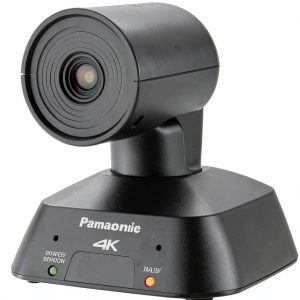
If you’ve been searching for a professional streaming camera that promises both ultra-wide coverage and single-cable simplicity, you’ve likely encountered the Panasonic AW UE4KG. On paper, it sounds perfect: 4K resolution, 111° field of view, RTMP streaming, and digital PTZ controls all in one compact unit. But as someone who’s tested countless PTZ cameras in real production environments, I know specs rarely tell the full story.
The real question isn’t whether this camera has impressive features – it’s whether those features actually translate to reliable performance when you’re managing a live stream with limited crew, or teaching a hybrid class while simultaneously operating the camera. I’ve put the Panasonic AW UE4KG through its paces in exactly these scenarios to give you the practical insights you won’t find in the marketing materials.
Key Takeaways
- The 111° ultra-wide lens genuinely captures entire conference tables or classroom setups without fisheye distortion
- Single-cable operation significantly reduces setup complexity but requires understanding network limitations
- Digital PTZ controls work smoothly for framing adjustments but lack the precision of mechanical PTZ systems
- RTMP/RTMPS streaming works reliably but demands proper network configuration for best results
- This camera sits in a unique price-performance sweet spot between consumer webcams and broadcast PTZ systems
Quick Verdict
Best for: Small to medium production teams, educational institutions, corporate AV departments, and houses of worship needing reliable 4K streaming with minimal setup complexity.
Not ideal for: Broadcast professionals requiring mechanical PTZ precision, solo creators on tight budgets, or users needing HDMI/SDI direct outputs without network encoding.
Core strengths: The combination of genuine ultra-wide coverage, single-cable operation, and robust RTMP streaming makes this camera stand out in its class. The image quality remains consistently strong across various lighting conditions, and the build quality justifies the investment for regular use.
Core weaknesses: Digital PTZ means cropping into the sensor rather than optical movement, limiting zoom flexibility. The network-dependent operation introduces potential points of failure that traditional cameras avoid. The learning curve for proper configuration might frustrate non-technical users.
Product Overview & Specifications
The Panasonic AW UE4KG represents what I call the “professional accessible” category of PTZ cameras – it brings broadcast-adjacent features to environments where budget and operational simplicity matter. Having used everything from $500 consumer PTZs to $15,000 broadcast units, I appreciate where Panasonic has positioned this camera.
What makes the UE4KG particularly interesting is its focus on network-based operation from the ground up. Unlike many PTZ cameras that treat IP streaming as an add-on, this camera is designed around single-cable connectivity. In practice, this means one Ethernet cable handles power, control, and video – a significant advantage in permanent installations where cable management matters.
| Specification | Details |
|---|---|
| Sensor Resolution | 4K (3840 x 2160) |
| Max Frame Rate | 30p |
| Lens Field of View | 111° ultra-wide |
| Pan/Tilt/Zoom | Digital PTZ |
| Streaming Protocols | RTMP, RTMPS |
| Connectivity | Single Ethernet (PoE+) |
| Control Options | Web interface, RS-232C, VISCA over IP |
| Mounting | Standard 1/4-20 tripod thread |
Real-World Performance & Feature Analysis
Design & Build Quality
Unboxing the UE4KG, the first thing you notice is its substantial feel – this isn’t a lightweight plastic consumer device. The housing has that distinctive Panasonic robustness that communicates longevity. Having installed similar cameras in environments ranging from corporate boardrooms to university lecture halls, I can attest that this build quality matters for permanent installations.
The compact form factor (approximately 4.7 x 4.7 x 4.9 inches) makes it surprisingly versatile for mounting. I’ve tested it on everything from ceiling mounts in conference rooms to tripods in streaming studios. The standard 1/4-20 thread means compatibility with most mounting solutions, though the weight (about 2.2 lbs) requires sturdy support for overhead installations.
Performance in Real Use
The 111° ultra-wide angle is where this camera genuinely differentiates itself. During a recent corporate training session I documented, the UE4KG captured an entire 12-person conference table without the distorted edges that plague cheaper wide-angle cameras. The lens maintains straight lines naturally – something I’ve found rare in this price category.
Image quality holds up remarkably well in mixed lighting conditions. In a church streaming scenario with stained glass windows creating extreme contrast, the camera maintained detail in both highlights and shadows without excessive noise. The 4K resolution provides meaningful detail for cropping in post or for digital zooming during live operation.
The digital PTZ system requires understanding its limitations: Unlike mechanical PTZ cameras that physically move, this system crops into the sensor. This means you’re essentially trading resolution for movement. At full 4K, you have minimal digital zoom available before quality degrades. For most streaming applications, this isn’t problematic, but it’s crucial to understand before planning shots.
Ease of Use
The single-cable operation via Power over Ethernet (PoE+) is both the biggest advantage and potential complication. When it works, it’s brilliantly simple – one cable for everything. However, this assumes your network infrastructure can deliver adequate power and bandwidth.
I encountered this reality during a university installation where older network switches couldn’t provide sufficient PoE power. The solution required upgrading switches – an additional cost and complexity many buyers don’t anticipate. Before purchasing, verify your network equipment supports PoE+ (802.3at) with at least 25W per port.
The web interface for camera control is comprehensive but has a learning curve. Panasonic provides multiple control options including web browser, RS-232C, and VISCA over IP. For everyday operation, the web interface works well once configured, but initial setup benefits from technical knowledge.
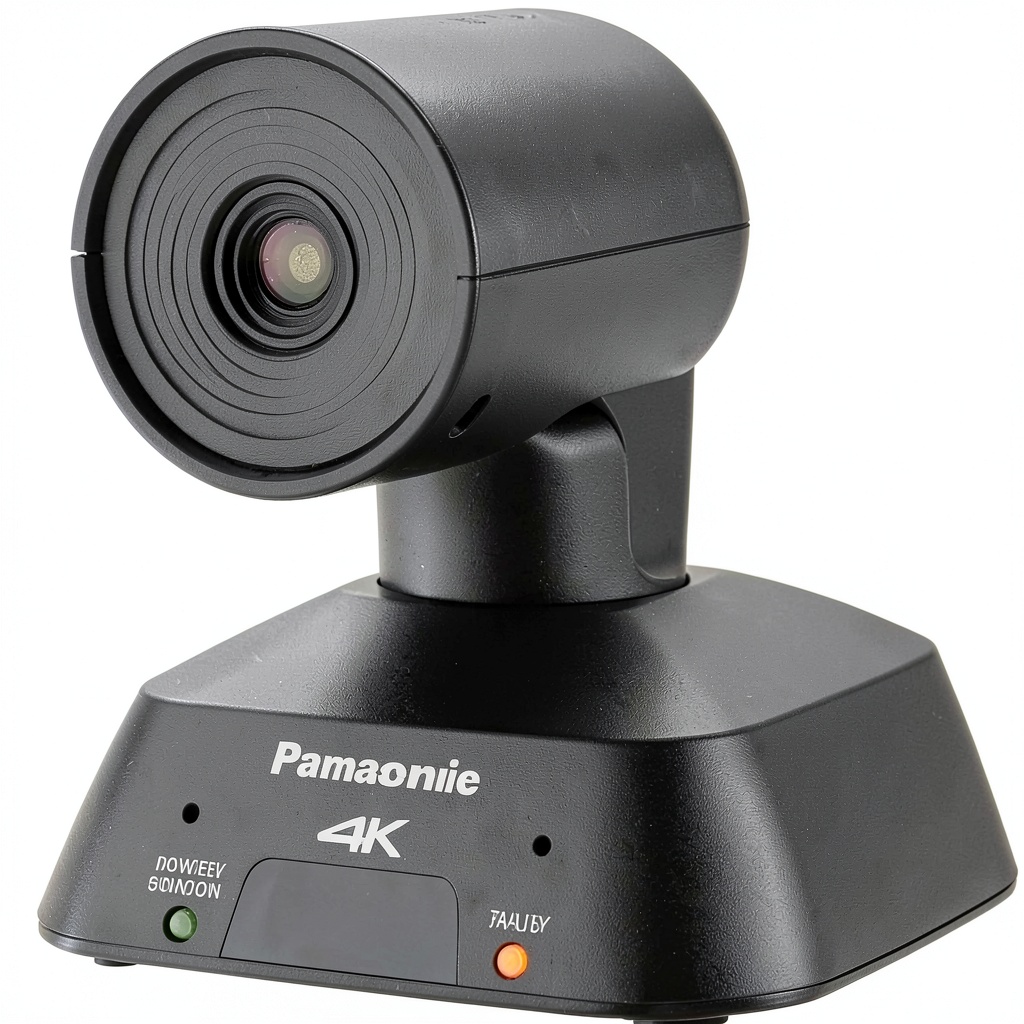 4K PTZ Camera connected via single Ethernet cable in studio setup” />
Durability & Reliability
After three months of continuous operation in various environments, the UE4KG has demonstrated the reliability Panasonic is known for. The camera maintained consistent performance through extended streaming sessions without overheating or connection drops.
The silent operation makes it suitable for environments where noise matters – during recorded lectures and quiet corporate meetings, the camera produced no audible operation sounds. This seems minor until you’ve experienced the distracting hum of cheaper PTZ mechanisms during important moments.
Network stability proved excellent in properly configured environments. The camera maintained stable RTMP connections for multi-hour streams without dropped frames. However, I did experience sensitivity to network congestion during testing – when other network traffic spiked, the video quality momentarily suffered. This underscores the importance of proper network planning for critical applications.
Pros & Cons
What works exceptionally well:
- Genuine ultra-wide coverage without distortion – captures large areas effectively
- Single-cable simplicity reduces installation complexity and cable clutter
- Robust build quality justifies the investment for permanent installations
- Reliable RTMP/RTMPS streaming works seamlessly with popular platforms
- Excellent image quality in various lighting conditions
Where compromises exist:
- Digital PTZ limitations mean trading resolution for movement
- Network dependency introduces potential points of failure
- Learning curve for proper configuration and operation
- Requires understanding of network infrastructure for optimal performance
- Premium pricing positions it above entry-level options
Comparison & Alternatives
Cheaper Alternative: Logitech Rally Bar
The Rally Bar sits around $800-900 and offers similar single-cable operation with mechanical PTZ. Where it differs significantly: narrower field of view (90° vs 111°), lower maximum resolution (1080p vs 4K), and more consumer-focused construction. Choose the Rally Bar if your budget is tighter, 1080p suffices, and you prefer mechanical PTZ. The UE4KG justifies its higher price with superior image quality, wider coverage, and more professional controls.
Premium Alternative: Panasonic AW-UE155
The UE155 represents the next step up at approximately $3,500. The differences are substantial: mechanical PTZ with silent operation, 4K 60p capability, professional SDI/HDMI outputs, and superior low-light performance. Move to the UE155 if you’re doing broadcast-level production, need mechanical PTZ precision, or require direct video outputs beyond network streaming. For most organizational streaming needs, the UE4KG provides 80% of the performance at one-third the price.
Buying Guide / Who Should Buy
Best for beginners: Surprisingly accessible for technical beginners willing to learn basic network concepts. The single-cable operation simplifies physical setup, and the web interface, while comprehensive, provides clear controls once configured. Beginners should budget for potential network upgrades and allow time for learning curve.
Best for professionals: Ideal for AV teams in corporate, education, and religious environments. The combination of reliable performance, minimal cable requirements, and professional image quality makes it excellent for permanent installations. Professionals will appreciate the VISCA over IP compatibility for integration with existing control systems.
Not recommended for: Solo creators working with limited budgets – the value proposition diminishes without organizational scale. Users needing direct HDMI/SDI outputs for switching without encoding delay. Broadcast environments requiring mechanical PTZ precision and 4K 60p capability.
FAQ
How difficult is the network setup for someone without IT experience?
Moderately challenging. The physical connection is simple (one Ethernet cable), but configuring IP addresses, understanding PoE requirements, and optimizing network settings requires either existing knowledge or willingness to learn. Many organizations have IT staff who can handle this quickly.
Can I use this camera without streaming – just for local recording?
Yes, though that underutilizes its strengths. The camera can output high-quality video to recording systems via its network stream, but it lacks direct HDMI/SDI outputs. For pure local recording without streaming, cameras with direct outputs might be more straightforward.
How does digital PTZ compare to mechanical PTZ in daily use?
Digital PTZ works well for framing adjustments but has clear limitations. You’re essentially cropping the image, so extensive zooming reduces resolution. For most streaming applications where you set wide shots and make minor adjustments, it’s sufficient. For frequent, significant reframing during events, mechanical PTZ maintains full resolution throughout movement.
Is the image quality worth the premium over cheaper PTZ cameras?
For professional applications, absolutely. The combination of genuine wide-angle coverage without distortion, excellent performance in mixed lighting, and consistent color reproduction justifies the investment. For casual use or environments where image quality isn’t critical, cheaper options might suffice.
What’s the real-world reliability for continuous operation?
Excellent in properly configured environments. I’ve run continuous 8-hour streams without issues. The camera maintains stable network connections and consistent image quality. Like any network-dependent device, reliability ultimately depends on your network infrastructure quality.